Sample Text Footer

Latest Post
Showing posts with label Tools. Show all posts

Hard Drive Inspector

Written By Unknown on Wednesday, July 18, 2012 | 10:05 PM

Version: 3.96
Platform: 2000/XP/2003 Server/Vista/Windows 7
Languages: English, Russian, Norwegian, Italian, German, Hebrew, French, Spanish, Dutch-Belgium, Slovak, Arabic, Vietnamese, Ukrainian, Portuguese-Brazil, Chinese-Taiwan, Czech, Greek, Hungarian, Bulgarian, Belorussian, Portuguese, Indonesian, Polish, Romanian, Farsi, Finnish, Turkish, Danish

Hard Drive Inspector is an easy-to-use program that monitors computer disks' health to prevent crashes and expensive hard disk recovery. The value of information stored on an average computer hard drive often exceeds the value of the computer itself. But a hard drive is one of the most unreliable internal computer devices. When it crashes (which happens quite frequently), the stored information will be lost fully or partially. Subsequent hard drive recovery is either not possible at all, or constitutes a very sophisticated and expensive procedure that can be performed only by specialists.

Advanced RAR Repair v1.2 Full Version


Advanced RAR Repair (ARAR) is the best tool to repair corrupt or damaged RAR files. It uses advanced technologies to scan the corrupt or damaged archives and recover your files in them as much as possible, so to minimize the loss in file corruption.

Main Features in Advanced RAR Repair v1.2

Arrow Support to repair all versions of RAR and SFX files.
Arrow Support to recover multi-volume and solid archives.
Arrow Support to recover archives encrypted by a password.
Arrow Support to find and select the RAR and SFX archives to be repaired on the local computer.
Arrow Support to upload corrupt RAR or SFX archives to our ftp server so that the qualified engineers in our file analysis center can help to analyze your archives efficiently.
Arrow Support to repair RAR files on corrupted medias, such as floppy disks, Zip disks, CDROMs, etc.
Arrow Support to repair a batch of RAR and SFX files.

code GeneratEasy Barcode Generator | QRor | Aurora3D Software


Barcodes make life easier, the way that they can hold a lot of information in such a small space. They’re used to track inventory levels, locations, and, in the case of QR codes, can even be used to invoke additional product information on the Internet. To take advantage of everything that the humble barcode has to offer, while still retaining the ability to be on the cutting edge of QR code technology, you’re going to need today’s discounted software promotion – Barcode Generator!

Barcode Generator gives you the ability to produce more than 32 different bar codes and QR codes, suitable for all types of business and personal applications. With Barcode Generator, you’ll be able to create barcodes in just three easy steps – just pick a template, edit contents/color/properties, and then export! You’re up and running with fully operational barcodes within minutes!

Inpaint photo restoration software


Inpaint will magically fill the selected area with intelligently-generated textures pulled from the surrounding image data. Go to our Tutorials page and see for yourself how easy it is for anyone to do with just a few simple steps. Download our Try-Before-You-Buy demo and use it on your own photos!

 Top Reasons to use Inpaint
  • Repair old photos
  • Remove watermarks
  • Erasing Power Lines
  • Remove unwanted objects
  • Digital Facial retouching
  • Remove date stamps
  • Erase wrinkles and skin blemishes
  • Remove tourists from travel photos
  • Easy to get use & started
  • Completely non-technical

How it works

Inpaint photo restoration software reconstructs the selected image area from the pixels near the area boundary. Remove undesirable objects from your images, such as logos, watermarks, power lines, people, text or any other undesired artefacts. There's no need to manually go through messing around with your old clone tool any more! Now you can use Inpaint to easily remove all those unexpected objects that end up spoiling an otherwise really great photograph.   

Netop MyVision Basic

Written By Unknown on Tuesday, July 17, 2012 | 11:44 PM

Essential Tools, a World of Difference

If you’re managing a classroom of computers, but you’re working with a tight budget, we’ve got a solution for you. It’s MyVision Basic, and it makes teaching with technology so much easier. 
MyVision brings you the most essential classroom management resources to help you connect with your students, ignite their interest and simplify the challenges of teaching with technology.

Fundamental tools for teaching with technology

MyVision Basic puts classroom management software within reach, even for teachers who have never been able to afford it before.

Easy to learn, intuitive to use; a low-cost subscription will transform your teaching experience (and student outcomes) for the better.


Extreme Copy Free

 What's ExtremeCopy ?

ExtremeCopy is a Windows copy file tool which copy file and move extremely fast and operation is simple the same as Windows Explorer default file copier,it can increase speed 20% ~ 120%  faster than Windows's default file copier for copy file. ExtremeCopy can integrate into Windows seamlessly as copy tool, learn more features, please go here to learn more features .

[Image]
 Latest version: 2.2.1
       

Support Operation System: XP / 2003 / VISTA / VISTA64 / Windows 7 32bit / Windows 7 64bit


Connectify 3.4 Pro Full Keygen

  
Connectify can easily act as your primary router or even a repeater for your home router, extending its range and providing Internet access wherever you need it. Connect to your home network, enter the same Wi-Fi name and password, and hit “Start Hotspot.” Devices will automatically connect to the Internet through either your Connectify hotspot or home router depending on proximity.
  
Before you know it you can finally have Internet access in that impossible back room or basement. In addition, if you run Connectify away from home with these settings, any devices that need to be bound to a specific network (such as Eye-Fi cards or wireless printers) will work flawlessly with no additional configuration no matter where you are! So forget trying to mess around on the command line with ICS, Virtual Wi-Fi, or Hosted Network, just install Connectify and have a real hotspot up and running in seconds.


VMware Workstation

 For Software Developers

Software developers rely on VMware Workstation’s integration with Visual Studio, Eclipse, and SpringSource Tools Suite to streamline the development and testing of their applications in multiple environments.

For QA Testers

Quality assurance teams use Workstation to efficiently and economically test applications on a complex matrix of operating systems, application platforms, and browsers—all while doing away with repetitive configuration tasks.

For Systems and Sales Engineers

Systems engineers and other technical sales professionals love Workstation because it gives them the power to demonstrate complex multi-tier applications with ease. Workstation can simulate an entire virtual network environment—including clients, servers and database virtual machines—all on a single PC.

For Teachers and Trainers

Instructors use VMware Workstation to create virtual machines for students that contain all the lessons, applications and tools required for the course. At the end of each class, VMware Workstation can automatically revert the virtual machines back to their original state, making the classroom ready for the next set of students.

Xilisoft DVD Creator


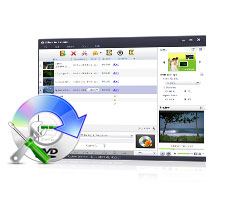
Preserve precious videos by burning them into DVD and share these priceless moments with friends and family with Xilisoft DVD Creator. It's the easiest and fastest way to convert popular video formats such as AVI, MPEG, DivX, DV, VOB, WMV or iPhone 4/iPhone 4S videos (MOV) to a format that is compatible to play with most portable or home DVD players. Besides burning DVD-format discs, the DVD movie creator also allows you to burn DVD folders and ISO files.
Xilisoft DVD Creator offers templates for creating stylish menus and inserting background picture and music for a more personalized feel. In addition to this, you may also clip video segments, add menu topic and opening film clip, load subtitles and audio tracks to create a more personalized DVD. Fast and easy to use, burn DVD movies with just a few clicks!

  • Create DVD from AVI, MPEG, WMV, DivX, XviD, MP4, or H.264/AVC formats.
  • Burn DVD-quality movies, DVD folders or ISO files.
  • Convert and burn AVI, MPEG, DivX, WMV to DVD.
  • Burn DVD with custom menu, audio tracks, subtitles, video thumbnails and video effect.
  • Create DVD movies from videos taken by iPhone 4, iPhone 4S, other smartphones as well as DVs.
Download LINK

Adobe Photoshop CS6

 What's new in Photoshop?

Adobe® Photoshop® CS6 software delivers even more imaging magic, new creative options, and the Adobe Mercury Graphics Engine for blazingly fast performance. Retouch with new Content-Aware features, and create superior designs as well as movies using new and reimagined tools and workflows.

Open Ratings Snapshot
See top new features in Photoshop CS6

See top new features in Photoshop CS6

Enhance your creativity and boost your productivity with the new Adobe Mercury Graphics Engine, groundbreaking new Content-Aware tools, reengineered design tools, and more.*

Experience imaging magic
 
Support : Creating Website | Johny Template | Mas Template
Copyright © 2011. working with tools - All Rights Reserved
Template Created by Creating Website Published by Mas Template
Proudly powered by Blogger